The question I wanted to test
Can GitHub Copilot find and call a Dataverse Custom API when I ask it to place an order—without naming the API?
Yes. In one recorded test, Copilot found demo_PlaceOrder, the order-placement API I built for this demo, checked the inputs it needed, and called it. The API rejected an order for 10 USB-C Hubs because only 9 were in stock. A later call requested 9, and the API reported a confirmed order totaling ₹22,491.
Copilot did not always find the API the same way, but the API enforced the stock limit in each test. The transcripts below show the requests, tool calls, and API responses from those tests.
Microsoft added Custom API discovery and invocation to Dataverse MCP in its October 26, 2026 release.
Why put order placement behind an API?
Placing an order requires a customer check, a stock check, a price calculation, an order record, a linked order item, and an inventory update. Independent client writes leave the client responsible for coordinating those changes.
For this example, I put those responsibilities in a synchronous C# plugin behind one unbound Custom API. Copilot supplies the inputs. Dataverse runs the business logic and returns the result. Other authorized applications can call the same operation with the same inputs.
The handoff from intent to operation
| Tool | What it does here | Value passed to the next step |
|---|---|---|
search |
Finds relevant APIs and table metadata | api/demo_PlaceOrder |
describe |
Describes what the API accepts and returns | Required inputs and their types |
invoke_api |
Executes the selected operation | Typed business outputs |
api/demo_PlaceOrder is a metadata resource path. demo_PlaceOrder is the unique name used for invocation. Neither is the environment's HTTP endpoint.
I supplied the customer and product IDs in these tests. Resolving an ambiguous business name to the right record is a separate problem.
What the Copilot tests showed
Across three tests, Copilot found and called the API in different ways. Each order requested 10 USB-C Hubs when only 9 were available, so the API rejected it. A follow-up call requested 9 and the API reported success. Open a transcript to see the request, tool calls, and response.
01 / API requested explicitlyI asked Copilot to find an order-placement API10 requested · 9 available · Rejected: insufficient stockRead transcript +Close transcript −
I explicitly asked for a Custom API, checked its inputs and outputs, then supplied record IDs and approved the order.
The approved order was for 10 USB-C Hubs, but only 9 were available.
Selected messages from my recorded Copilot chats, recreated here for reading. Private IDs are hidden.
02 / Tables firstCopilot tried table lookups before finding the API10 requested · 9 available · Rejected: insufficient stockRead transcript +Close transcript −
The request supplied record IDs and a quantity, without naming the Custom API.
The three failed table lookups explain why Copilot changed approach. Other table listings and record reads are left out. These errors apply to this recorded session.
Selected messages from my recorded Copilot chats, recreated here for reading. Private IDs are hidden.
03 / API search firstCopilot found the API without a failed lookup first10 requested · 9 available · Rejected: insufficient stockRead transcript +Close transcript −
I supplied the customer and product IDs without naming the API. Copilot used search, checked the API’s inputs with describe, and called it with invoke_api.
The API rejected the order for exceeding available stock. The follow-up below continues this conversation.
Selected messages from my recorded Copilot chats, recreated here for reading. Private IDs are hidden.
Follow-up / Ordering within available stockThe API accepted an order for 9 USB-C Hubs9 requested · ₹22,491 total · API reported successRead transcript +Close transcript −
The earlier order for 10 USB-C Hubs exceeded the 9 in stock. In a later call, Copilot sent a quantity of 9 and the API reported success. This continues the third test above, not a fourth discovery test.
The original prompt contains conflicting quantities: its opening says 10, but its Quantity field and the API input both say 9. A separate search call also requested sign-in. Both details are kept in the transcript below; the success shown here is the API’s returned result.
Selected messages from my recorded Copilot chats, recreated here for reading. Private IDs are hidden.
See the expected stock and order changes
This recreated dashboard uses the starting values in the catalog screenshot. The second view shows the expected result of ordering 9 units, not a screenshot of the saved records.
01 / Starting reference
NOVA · Order Studio
Product catalog.
USB-C Hub
NVA-HUB-007
₹2,499
9 in stock
Recent orders
Existing orders remain unchanged.
The example below shows the new order separately.
02 / Expected after
NOVA · Order Studio
Product catalog.
USB-C Hub
NVA-HUB-007
₹2,499
0 in stock
Recent orders
New USB-C Hub order
Confirmed
₹22,491
Linked order item
9 × USB-C Hub
₹2,499 each · ₹22,491 line total
A request for 10 units exceeds the 9 available: the plugin rejects it before writing. The expected change above uses the successful request for 9 units.
View the product catalog screenshot. It shows the USB-C Hub at ₹2,499 with 9 in stock—the starting values used in this illustration.
Read the business result, not just the tool status. All three rejection calls returned isError: false at the tool level, with Success: false in the business payload. Reaching the API and completing an order are different outcomes.
How I counted the runs and selected the excerpts
I ran three distinct discovery tests. The later call for 9 USB-C Hubs continues the third conversation; it is not a fourth discovery test. Repeated copies of the same exchange are counted once.
Each panel keeps the request, the relevant tool calls, their inputs and results, and Copilot’s reply. I left out unrelated setup messages and repeated questions, and replaced private record IDs and the server name with placeholders.
The chat view recreates those saved messages; it does not run Copilot or connect to Dataverse. Copilot’s reply and the tool response are shown separately. The dashboard comparison is an illustration of the expected record changes, separate from these recorded responses.
Why isError: false can still mean the order was rejected
A tool can run successfully while the API rejects the order. In the stock-rejection calls, the tool reported isError: false; the returned business field was Success: false, with zero total and an empty order GUID.
My plugin checks stock before making any changes. If the requested quantity exceeds availability, it returns the rejection immediately.
Set up Dataverse MCP in VS Code
For the full connection walkthrough and troubleshooting, see Connect Dataverse MCP to GitHub Copilot in VS Code. The steps below are the quick reference for this study.
You need a Dataverse development environment, a user with access to the relevant records, VS Code with GitHub Copilot available, and permission to use the Dataverse MCP client. The sample writes business data, so use disposable demo records.
1. Allow the GitHub Copilot client
In the Power Platform admin center, select Manage → Environments → your environment → Settings → Product → Features. Find Dataverse Model Context Protocol, enable Allow MCP clients to interact with Dataverse MCP server, and save the feature setting. Open Advanced Settings, find Microsoft GitHub Copilot, set Is Enabled to Yes, and choose Save & Close.
Permissions and client access explained
An administrator may need to make this change. Client allowlisting controls access through /api/mcp; it does not replace Dataverse record privileges or govern every direct Web API call. Microsoft's environment configuration guide.
2. Add the environment endpoint
Open the VS Code Command Palette and run MCP: Add Server. Choose the HTTP option and enter your environment's instance URL with /api/mcp appended. Name the server and choose workspace or global scope. Start the server through MCP: List Servers if needed. Complete Microsoft sign-in when prompted—during startup or on the first chat request—then use Copilot Chat in Agent mode. Review tool approvals separately from sign-in.
Use the instance URL from Power Apps → Settings → Session details. This connection uses /api/mcp, rather than the /api/data/v9.2 Web API path. Microsoft's VS Code setup steps.
For a workspace, the equivalent .vscode/mcp.json configuration is below. Replace the example hostname with your own environment. Keep authentication in the client's sign-in flow.
{
  "servers": {
    "Dataverse": {
      "type": "http",
      "url": "https://YOUR-ENVIRONMENT.crm.dynamics.com/api/mcp"
    }
  }
}
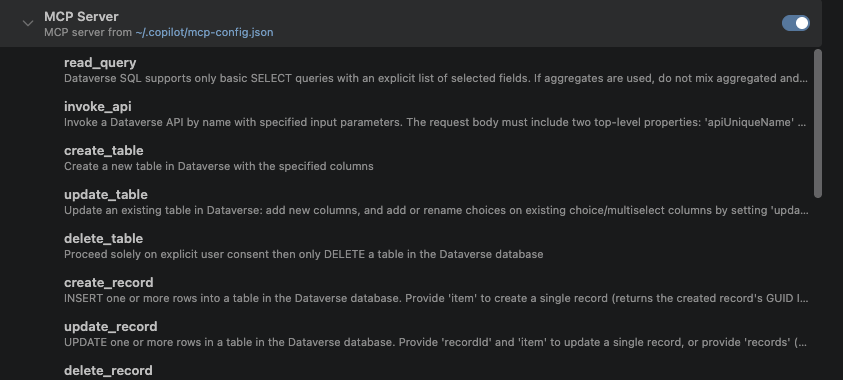
Client differences and connection screenshot
VS Code uses the servers configuration key. Copilot CLI uses a different configuration shape. Copy the format for the client you are using, and review the server trust and tool approvals before running writes. VS Code MCP configuration reference.
3. Check discovery before making a write
Start with a read-only request. This example asks Copilot to find the API and explain its inputs without placing an order.
Use the Dataverse MCP connection to find a Custom API for placing
customer orders. Describe its required inputs and outputs.
Do not invoke it or change any records yet.
Confirm that metadata search finds your API and that describe returns the expected input names. An absent invoke_api tool, a failed sign-in, and an API that is not discoverable are different failures. The troubleshooting section below separates them.
Build the Custom API and its data model
I built the demo with three custom tables—Product, Order, and Order Item—and used the standard Account table for customers. The solution connects these tables to the order-placement API. The source download includes my C# implementation and the API definition used in this demo.
Table schema, relationships, and choice values
| Table | Columns used by the operation |
|---|---|
account |
name, statecode |
demo_product |
demo_name, demo_unitprice (Money), demo_stock (Whole Number), transactioncurrencyid, statecode |
demo_order |
demo_name, demo_customer (Account lookup), demo_total (Money), demo_orderstatus (Choice), transactioncurrencyid |
demo_orderitem |
demo_name, demo_order (Order lookup), demo_product (Product lookup), demo_quantity (Whole Number), demo_unitprice and demo_linetotal (Money), transactioncurrencyid |
An Account can have multiple Orders. An Order can have multiple Order Items, and each item references a Product. This API creates one line per invocation. The product table also has SKU and reorder-point fields, but the operation does not use them.
The demo’s order-status choice uses Pending = 100000000 and Confirmed = 100000001. Preserve these values for this source, or change the constants to match your schema. Money columns bring a transaction currency relationship; seed the product with the appropriate currency.
Register the main operation
Create the tables in an unmanaged development solution with the demo publisher prefix. Build and register the plugin type, then create the Custom API in the solution. The maker portal path is New → More → Other → Custom API. Request parameters and response properties are separate solution components associated with that API. Microsoft also offers a Custom API designer in the Plug-in Registration Tool. Create a Custom API.
API registration settings used in this demo
I configured the API with the following settings, also included in the source download.
| Setting | Demo configuration |
|---|---|
| Unique name | demo_PlaceOrder |
| Binding type | Global / unbound |
| Is Function | No — the operation changes data |
| Is Private | No — metadata is discoverable |
| Allowed custom processing steps | None |
| Main-operation plugin type | Nova.OrderProcessing.PlaceOrderPlugin |
| Execute privilege name | Empty in this demo |
Associate the registered type as the API's Plugin Type. I registered the plugin as the main operation for demo_PlaceOrder, at stage 30. This sample does not use an extra pre/post-operation step.
An empty execute privilege is a demo configuration, not a recommendation for production authorization. Review execution identity and table privileges before distributing this pattern beyond a sandbox.
Define the typed contract
The contract lists the inputs the API accepts and the outputs it returns. This order-placement API takes three inputs and returns four fields.
| Direction | Name | Dataverse type | Purpose |
|---|---|---|---|
| Required input | CustomerId |
Guid | Existing Account |
| Required input | ProductId |
Guid | Existing demo_product |
| Required input | Quantity |
Integer | Units to purchase |
| Output | Success |
Boolean | Business outcome |
| Output | OrderId |
Guid | New order, or empty GUID for rejection |
| Output | TotalAmount |
Decimal | Calculated amount |
| Output | Message |
String | Human-readable outcome |
Metadata representations and the API definition
The captured MCP describe response represents GUID inputs as strings. Inside Dataverse, the plugin validates native Guid values. These are representations at different layers of the same contract.
I wrote the API description to explain its checks, the records it creates, and the values it returns. It also asks callers to use this operation instead of separate record updates. That gives Copilot useful context after discovery; permissions and the plugin’s validation enforce the actual rules.
demo_PlaceOrder
Solution reference · Global action
Unique name
demo_PlaceOrder
Binding type
Global (unbound)
Plugin type
Nova.OrderProcessing.PlaceOrderPlugin
Is Function
No
Is Private
No
Allowed custom processing steps
None
Execute privilege name
Not set in this demo
Request parameters
| Name | Type | Required |
|---|---|---|
| CustomerId | Guid | Yes |
| ProductId | Guid | Yes |
| Quantity | Integer | Yes |
Response properties
| Name | Type |
|---|---|
| Success | Boolean |
| OrderId | Guid |
| TotalAmount | Decimal |
| Message | String |
API configuration from my demo solution, recreated here for reference. These settings are also included in the source download; this is not a screenshot of the maker portal.
Call the API with invoke_api
First test the API directly in your development environment, then introduce the agent. Seed an active Account and Product with a positive price, currency, and known stock. The recorded example used a USB-C Hub priced at ₹2,499 with 9 units available.
Use this invocation template with your own Account and Product record GUIDs.
{
  "apiUniqueName": "demo_PlaceOrder",
  "apiInputs": {
    "CustomerId": "<account-guid>",
    "ProductId": "<product-guid>",
    "Quantity": 9
  }
}
Prefer a direct Web API test? Use this request
For a direct authenticated Web API test, this unbound action uses a POST to the following path, with the three input properties as the JSON body. A Web API request does not use the surrounding apiUniqueName / apiInputs wrapper.
POST https://YOUR-ENVIRONMENT.crm.dynamics.com/api/data/v9.2/demo_PlaceOrder
Content-Type: application/json

{
  "CustomerId": "<account-guid>",
  "ProductId": "<product-guid>",
  "Quantity": 9
}
Send the request through an authenticated Dataverse client with permission to run the operation.
To reproduce the discovery test without naming the API, use this sample prompt with your own record GUIDs.
Using the Dataverse MCP connection, place an order in my demo
environment for exactly 9 units of the following product.

CustomerId: <account-guid>
ProductId: <product-guid>
Quantity: 9

I authorize this demo order. Report the operation called and
its returned business result. Do not silently change the quantity.
Inside the C# order-processing plugin
I wrote the C# plugin to validate each order, update stock, and create the linked Order and Order Item records in one transaction. The complete implementation from this demo is available to read and download below.
The implementation takes these steps in order.
- Check the message name and main-operation stage. Validate GUID and integer input types, then reject non-positive quantities.
- Require transactional execution. Retrieve the Account and Product, reject inactive records, and validate price and currency.
- Reject insufficient stock before writing. Require a product row version.
- Update stock with a row-version check. Create the order in Pending status and create its linked item with price and total snapshots.
- Confirm the order and return the typed response. Throw on execution faults so the transaction can abort.
How transaction and concurrency protection work
The plugin requires a transaction and performs its writes through the Dataverse organization service. If a write fails, it throws an exception so Dataverse can roll back the transaction. This keeps the stock update, order, and order item within the same transaction. Dataverse database transactions.
The retrieved product's row version is included in an UpdateRequest. If another operation changes the record before this update, the version check can fail instead of overwriting the newer state.
Entity stockUpdate = new Entity("demo_product", productId)
{
    RowVersion = product.RowVersion
};
stockUpdate["demo_stock"] = remaining;
service.Execute(new UpdateRequest
{
    Target = stockUpdate,
    ConcurrencyBehavior = ConcurrencyBehavior.IfRowVersionMatches
});
I handle a version mismatch by throwing an InvalidPluginExecutionException with a message asking the caller to refresh and try again. When adapting the demo, enable optimistic concurrency on the product table and test two requests against the same stock. Microsoft's optimistic concurrency documentation.
Read or download the complete source
Download the source package — includes the operation, its supporting base class, an unsigned build project, the API contract, and setup notes.
View PlaceOrderPlugin.cs
using System;
using System.ServiceModel;
using Microsoft.Xrm.Sdk;
using Microsoft.Xrm.Sdk.Messages;
using Microsoft.Xrm.Sdk.Query;

namespace Nova.OrderProcessing
{
    public sealed class PlaceOrderPlugin : global::PlaceOrderPlugin.PluginBase
    {
        private const string ApiName = "demo_PlaceOrder";
        private const int Pending = 100000000;
        private const int Confirmed = 100000001;
        private const int ConcurrencyVersionMismatch = -2147088254;

        public PlaceOrderPlugin() : base(typeof(PlaceOrderPlugin)) { }

        public PlaceOrderPlugin(string unsecureConfiguration, string secureConfiguration)
            : this() { }

        protected override void ExecuteDataversePlugin(global::PlaceOrderPlugin.ILocalPluginContext local)
        {
            if (local == null)
                throw new ArgumentNullException(nameof(local));

            IPluginExecutionContext context = local.PluginExecutionContext;
            IOrganizationService service = local.PluginUserService;

            if (!string.Equals(context.MessageName, ApiName, StringComparison.OrdinalIgnoreCase)
                || context.Stage != 30)
            {
                throw new InvalidPluginExecutionException(
                    "This plug-in is designed for the demo_PlaceOrder Custom API main operation.");
            }

            Guid customerId = GetGuid(context, "CustomerId");
            Guid productId = GetGuid(context, "ProductId");
            int quantity = GetInteger(context, "Quantity");

            if (quantity <= 0)
            {
                Respond(context, false, Guid.Empty, 0m,
                    "Quantity must be greater than zero.");
                return;
            }

            if (!context.IsInTransaction)
            {
                throw new InvalidPluginExecutionException(
                    "Order processing requires a synchronous transactional execution.");
            }

            try
            {
                Entity customer = service.Retrieve("account", customerId,
                    new ColumnSet("name", "statecode"));
                if (customer.GetAttributeValue<OptionSetValue>("statecode")?.Value == 1)
                {
                    Respond(context, false, Guid.Empty, 0m,
                        "The selected customer account is inactive.");
                    return;
                }

                Entity product = service.Retrieve("demo_product", productId,
                    new ColumnSet("demo_name", "demo_unitprice", "demo_stock",
                        "transactioncurrencyid", "statecode"));

                if (product.GetAttributeValue<OptionSetValue>("statecode")?.Value == 1)
                {
                    Respond(context, false, Guid.Empty, 0m,
                        "The selected product is inactive.");
                    return;
                }

                string productName = product.GetAttributeValue<string>("demo_name")
                    ?? "Product";
                Money unitPrice = product.GetAttributeValue<Money>("demo_unitprice");
                EntityReference currency = product.GetAttributeValue<EntityReference>(
                    "transactioncurrencyid");
                int available = product.GetAttributeValue<int>("demo_stock");

                if (unitPrice == null || unitPrice.Value <= 0m || currency == null)
                {
                    Respond(context, false, Guid.Empty, 0m,
                        "Product price or currency is missing or invalid.");
                    return;
                }

                if (available < quantity)
                {
                    Respond(context, false, Guid.Empty, 0m,
                        $"Insufficient stock for {productName}. Available: {available}; requested: {quantity}.");
                    return;
                }

                if (string.IsNullOrWhiteSpace(product.RowVersion))
                {
                    throw new InvalidPluginExecutionException(
                        "Product row version is unavailable. The order was not created.");
                }

                decimal total = Math.Round(unitPrice.Value * quantity, 2,
                    MidpointRounding.AwayFromZero);
                int remaining = available - quantity;

                Entity stockUpdate = new Entity("demo_product", productId)
                {
                    RowVersion = product.RowVersion
                };
                stockUpdate["demo_stock"] = remaining;
                service.Execute(new UpdateRequest
                {
                    Target = stockUpdate,
                    ConcurrencyBehavior = ConcurrencyBehavior.IfRowVersionMatches
                });

                Guid orderId = Guid.NewGuid();
                string orderNumber = "NOVA-ORD-" + orderId.ToString("N")
                    .Substring(0, 10).ToUpperInvariant();

                Entity order = new Entity("demo_order", orderId);
                order["demo_name"] = orderNumber;
                order["demo_customer"] = new EntityReference("account", customerId);
                order["transactioncurrencyid"] = currency;
                order["demo_total"] = new Money(total);
                order["demo_orderstatus"] = new OptionSetValue(Pending);
                service.Create(order);

                Entity item = new Entity("demo_orderitem");
                item["demo_name"] = $"{quantity} x {productName}";
                item["demo_order"] = new EntityReference("demo_order", orderId);
                item["demo_product"] = new EntityReference("demo_product", productId);
                item["demo_quantity"] = quantity;
                item["demo_unitprice"] = new Money(unitPrice.Value);
                item["demo_linetotal"] = new Money(total);
                item["transactioncurrencyid"] = currency;
                service.Create(item);

                Entity confirm = new Entity("demo_order", orderId);
                confirm["demo_orderstatus"] = new OptionSetValue(Confirmed);
                service.Update(confirm);

                Respond(context, true, orderId, total,
                    $"Order {orderNumber} confirmed. {quantity} x {productName}. " +
                    $"Total: INR {total:0.00}. Remaining inventory: {remaining}.");

                local.Trace($"Order created. OrderId={orderId}; ProductId={productId}; " +
                    $"Quantity={quantity}; RemainingStock={remaining}");
            }
            catch (FaultException<OrganizationServiceFault> ex)
                when (ex.Detail != null && ex.Detail.ErrorCode == ConcurrencyVersionMismatch)
            {
                throw new InvalidPluginExecutionException(
                    "Inventory changed while processing the order. Please refresh and try again.", ex);
            }
            catch (InvalidPluginExecutionException)
            {
                throw;
            }
            catch (Exception ex)
            {
                local.Trace($"PlaceOrder failure: {ex}");
                throw new InvalidPluginExecutionException(
                    "Order processing failed. The transaction was cancelled. Check the plug-in trace log.",
                    ex);
            }
        }

        private static Guid GetGuid(IPluginExecutionContext context, string key)
        {
            if (!context.InputParameters.Contains(key)
                || !(context.InputParameters[key] is Guid)
                || (Guid)context.InputParameters[key] == Guid.Empty)
            {
                throw new InvalidPluginExecutionException(
                    $"'{key}' must be a valid, non-empty Dataverse record GUID.");
            }
            return (Guid)context.InputParameters[key];
        }

        private static int GetInteger(IPluginExecutionContext context, string key)
        {
            if (!context.InputParameters.Contains(key)
                || !(context.InputParameters[key] is int))
            {
                throw new InvalidPluginExecutionException(
                    $"'{key}' must be an integer.");
            }
            return (int)context.InputParameters[key];
        }

        private static void Respond(IPluginExecutionContext context,
            bool success, Guid orderId, decimal amount, string message)
        {
            context.OutputParameters["Success"] = success;
            context.OutputParameters["OrderId"] = orderId;
            context.OutputParameters["TotalAmount"] = amount;
            context.OutputParameters["Message"] = message;
        }
    }
}
View PluginBase.cs
using Microsoft.Xrm.Sdk;
using Microsoft.Xrm.Sdk.Extensions;
using Microsoft.Xrm.Sdk.PluginTelemetry;
using System;
using System.Runtime.CompilerServices;
using System.ServiceModel;

namespace PlaceOrderPlugin
{
    /// <summary>
    /// Base class for all plug-in classes.
    /// Plugin development guide: https://docs.microsoft.com/powerapps/developer/common-data-service/plug-ins
    /// Best practices and guidance: https://docs.microsoft.com/powerapps/developer/common-data-service/best-practices/business-logic/
    /// </summary>
    public abstract class PluginBase : IPlugin
    {
        protected string PluginClassName { get; }

        /// <summary>
        /// Initializes a new instance of the <see cref="PluginBase"/> class.
        /// </summary>
        /// <param name="pluginClassName">The <see cref="Type"/> of the plugin class.</param>
        internal PluginBase(Type pluginClassName)
        {
            PluginClassName = pluginClassName.ToString();
        }

        /// <summary>
        /// Main entry point for he business logic that the plug-in is to execute.
        /// </summary>
        /// <param name="serviceProvider">The service provider.</param>
        /// <remarks>
        /// </remarks>
        [System.Diagnostics.CodeAnalysis.SuppressMessage("Microsoft.Globalization", "CA1303:Do not pass literals as localized parameters", Justification = "Execute")]
        public void Execute(IServiceProvider serviceProvider)
        {
            if (serviceProvider == null)
            {
                throw new InvalidPluginExecutionException(nameof(serviceProvider));
            }

            // Construct the local plug-in context.
            var localPluginContext = new LocalPluginContext(serviceProvider);

            localPluginContext.Trace($"Entered {PluginClassName}.Execute() " +
                $"Correlation Id: {localPluginContext.PluginExecutionContext.CorrelationId}, " +
                $"Initiating User: {localPluginContext.PluginExecutionContext.InitiatingUserId}");

            try
            {
                // Invoke the custom implementation
                ExecuteDataversePlugin(localPluginContext);

                // Now exit - if the derived plugin has incorrectly registered overlapping event registrations, guard against multiple executions.
                return;
            }
            catch (FaultException<OrganizationServiceFault> orgServiceFault)
            {
                localPluginContext.Trace($"Exception: {orgServiceFault.ToString()}");

                throw new InvalidPluginExecutionException($"OrganizationServiceFault: {orgServiceFault.Message}", orgServiceFault);
            }
            finally
            {
                localPluginContext.Trace($"Exiting {PluginClassName}.Execute()");
            }
        }

        /// <summary>
        /// Placeholder for a custom plug-in implementation.
        /// </summary>
        /// <param name="localPluginContext">Context for the current plug-in.</param>
        protected virtual void ExecuteDataversePlugin(ILocalPluginContext localPluginContext)
        {
            // Do nothing.
        }
    }

    /// <summary>
    /// This interface provides an abstraction on top of IServiceProvider for commonly used PowerPlatform Dataverse Plugin development constructs
    /// </summary>
    public interface ILocalPluginContext
    {
        /// <summary>
        /// The PowerPlatform Dataverse organization service for the Current Executing user.
        /// </summary>
        IOrganizationService InitiatingUserService { get; }

        /// <summary>
        /// The PowerPlatform Dataverse organization service for the Account that was registered to run this plugin, This could be the same user as InitiatingUserService.
        /// </summary>
        IOrganizationService PluginUserService { get; }

        /// <summary>
        /// IPluginExecutionContext contains information that describes the run-time environment in which the plug-in executes, information related to the execution pipeline, and entity business information.
        /// </summary>
        IPluginExecutionContext PluginExecutionContext { get; }

        /// <summary>
        /// Synchronous registered plug-ins can post the execution context to the Microsoft Azure Service Bus. <br/>
        /// It is through this notification service that synchronous plug-ins can send brokered messages to the Microsoft Azure Service Bus.
        /// </summary>
        IServiceEndpointNotificationService NotificationService { get; }

        /// <summary>
        /// Provides logging run-time trace information for plug-ins.
        /// </summary>
        ITracingService TracingService { get; }

        /// <summary>
        /// General Service Provide for things not accounted for in the base class.
        /// </summary>
        IServiceProvider ServiceProvider { get; }

        /// <summary>
        /// OrganizationService Factory for creating connection for other then current user and system.
        /// </summary>
        IOrganizationServiceFactory OrgSvcFactory { get; }

        /// <summary>
        /// ILogger for this plugin.
        /// </summary>
        ILogger Logger { get;  }

        /// <summary>
        /// Writes a trace message to the trace log.
        /// </summary>
        /// <param name="message">Message name to trace.</param>
        void Trace(string message, [CallerMemberName] string method = null);
    }

    /// <summary>
    /// Plug-in context object.
    /// </summary>
    public class LocalPluginContext : ILocalPluginContext
    {
        /// <summary>
        /// The PowerPlatform Dataverse organization service for the Current Executing user.
        /// </summary>
        public IOrganizationService InitiatingUserService { get; }

        /// <summary>
        /// The PowerPlatform Dataverse organization service for the Account that was registered to run this plugin, This could be the same user as InitiatingUserService.
        /// </summary>
        public IOrganizationService PluginUserService { get; }

        /// <summary>
        /// IPluginExecutionContext contains information that describes the run-time environment in which the plug-in executes, information related to the execution pipeline, and entity business information.
        /// </summary>
        public IPluginExecutionContext PluginExecutionContext { get; }

        /// <summary>
        /// Synchronous registered plug-ins can post the execution context to the Microsoft Azure Service Bus. <br/>
        /// It is through this notification service that synchronous plug-ins can send brokered messages to the Microsoft Azure Service Bus.
        /// </summary>
        public IServiceEndpointNotificationService NotificationService { get; }

        /// <summary>
        /// Provides logging run-time trace information for plug-ins.
        /// </summary>
        public ITracingService TracingService { get; }

        /// <summary>
        /// General Service Provider for things not accounted for in the base class.
        /// </summary>
        public IServiceProvider ServiceProvider { get; }

        /// <summary>
        /// OrganizationService Factory for creating connection for other then current user and system.
        /// </summary>
        public IOrganizationServiceFactory OrgSvcFactory { get; }

        /// <summary>
        /// ILogger for this plugin.
        /// </summary>
        public ILogger Logger { get; }

        /// <summary>
        /// Helper object that stores the services available in this plug-in.
        /// </summary>
        /// <param name="serviceProvider"></param>
        public LocalPluginContext(IServiceProvider serviceProvider)
        {
            if (serviceProvider == null)
            {
                throw new InvalidPluginExecutionException(nameof(serviceProvider));
            }

            ServiceProvider = serviceProvider;

            Logger = serviceProvider.Get<ILogger>();

            PluginExecutionContext = serviceProvider.Get<IPluginExecutionContext>();

            TracingService = new LocalTracingService(serviceProvider);

            NotificationService = serviceProvider.Get<IServiceEndpointNotificationService>();

            OrgSvcFactory = serviceProvider.Get<IOrganizationServiceFactory>();

            PluginUserService = serviceProvider.GetOrganizationService(PluginExecutionContext.UserId); // User that the plugin is registered to run as, Could be same as current user.

            InitiatingUserService = serviceProvider.GetOrganizationService(PluginExecutionContext.InitiatingUserId); //User who's action called the plugin.

        }

        /// <summary>
        /// Writes a trace message to the trace log.
        /// </summary>
        /// <param name="message">Message name to trace.</param>
        public void Trace(string message, [CallerMemberName] string method = null)
        {
            if (string.IsNullOrWhiteSpace(message) || TracingService == null)
            {
                return;
            }

            if (method != null)
                TracingService.Trace($"[{method}] - {message}");
            else
                TracingService.Trace($"{message}");
        }
    }

    /// <summary>
    /// Specialized ITracingService implementation that prefixes all traced messages with a time delta for Plugin performance diagnostics
    /// </summary>
    public class LocalTracingService : ITracingService
    {
        private readonly ITracingService _tracingService;

        private DateTime _previousTraceTime;

        public LocalTracingService(IServiceProvider serviceProvider)
        {
            DateTime utcNow = DateTime.UtcNow;

            var context = (IExecutionContext)serviceProvider.GetService(typeof(IExecutionContext));

            DateTime initialTimestamp = context.OperationCreatedOn;

            if (initialTimestamp > utcNow)
            {
                initialTimestamp = utcNow;
            }

            _tracingService = (ITracingService)serviceProvider.GetService(typeof(ITracingService));

            _previousTraceTime = initialTimestamp;
        }

        public void Trace(string message, params object[] args)
        {
            var utcNow = DateTime.UtcNow;

            // The duration since the last trace.
            var deltaMilliseconds = utcNow.Subtract(_previousTraceTime).TotalMilliseconds;

            try
            {

                if (args == null || args.Length == 0)
                    _tracingService.Trace($"[+{deltaMilliseconds:N0}ms] - {message}");
                else
                    _tracingService.Trace($"[+{deltaMilliseconds:N0}ms] - {string.Format(message, args)}");
            }
            catch (FormatException ex)
            {
                throw new InvalidPluginExecutionException($"Failed to write trace message due to error {ex.Message}", ex);
            }
            _previousTraceTime = utcNow;
        }
    }
}
Build and registration notes for the source package
The plugin targets .NET Framework 4.6.2 and uses Dataverse SDK assemblies. The download includes an unsigned project for building the sample. Generate your own signing key and follow the current plugin registration requirements before deploying a DLL. Register Nova.OrderProcessing.PlaceOrderPlugin, associate it with the API, and verify the contract in your own environment. Write a Dataverse plugin.
Before using this implementation in production, address authorization, duplicate requests, currency rules, and other write paths.
Production hardening: identity, retries, currency, and bypasses
Execution identity. The supporting base class creates PluginUserService with context.UserId. That may differ from InitiatingUserId. Review impersonation, the API's execute privilege, and the table access required for the entire operation.
Duplicate requests. There is no idempotency key. A repeated successful request can create another order. Add a durable request identifier and duplicate-handling policy before introducing automatic retries.
Money and currency. The plugin copies the product's currency to the order and item, rounds the total to two decimals, and hardcodes “INR” in the returned message. That is suitable only for this constrained demo. A general implementation needs currency-aware precision, labels, and any relevant tax or discount rules.
Other write paths. Discoverability is not authorization. An agent with direct create/update privileges may still bypass this API. Enforce critical invariants server-side and review which tools and record privileges are exposed.
What this demo shows
Copilot can find a Custom API, check its required inputs, and call it from an order request. It did not always take the same route: one test started with table lookups, while another found the API directly. The API rejected requests that exceeded stock and reported success when the requested quantity matched the available stock.
The useful separation is between intent and execution: Copilot turns the request into an API call; the plugin owns validation and the related record changes. For a production application, add the authorization, retry handling, and currency rules described above.
What the recordings can tell us about tool selection
They do not establish the internal cause of the agent's first search decision, its underlying model, or a universal preference for APIs over CRUD. The visible model label was an automatic Copilot routing label. Copilot's later explanations of its own decisions are not independent proof of the instructions that caused them.
Copilot retrieved the API description after searching. The description helps it assess the operation once found, but does not explain the earlier decision to search. Tool descriptions, client instructions, conversation context, and the request can all affect that choice.
Test the implementation in your own environment
The transcripts demonstrate API discovery, stock rejection, and a successful API response. Use these additional checks when adapting the demo to your own application.
| Scenario | What to check |
|---|---|
| Successful order | The returned Order ID identifies a confirmed order with the correct customer, linked item, total, and currency. Stock decreases by the ordered quantity. |
| Insufficient stock | The API rejects the request without creating an order or changing stock. |
| Failure during a write | Force a failure after the stock update in a development environment. Check that rollback leaves no partial order, item, or stock change. |
| Concurrent orders | Send competing requests for the same stock. Check that a version conflict prevents an update based on stale stock. |
| Duplicate request | The demo has no idempotency key. Add duplicate-request handling before enabling automatic retries. |
| API discovery | Repeat with different prompts and compare the actual tool calls; do not assume Copilot always chooses the same route. |
The before/after dashboard illustrates the expected changes using the catalog’s starting values; it is not a capture of the saved records from the call.
Troubleshooting and common questions
Why is the Dataverse MCP connection failing?
Check the environment instance URL, the /api/mcp suffix, the GitHub Copilot client allowlist, the signed-in user's environment access, and the VS Code server output. An OAuth challenge requires resolving authentication through the client. The follow-up transcript includes a failed search and a successful API call in the same conversation. That does not mean sign-in errors can be ignored.
Why can I connect but not find invoke_api or my API?
Inspect the tools actually advertised by the connected server. If invoke_api is absent, check the current Microsoft release guidance and environment support. If the tool is present but the operation is missing, verify the API exists in that environment, is discoverable, has been published, and has a useful name and description. Search the API's unique name, then inspect the returned resource with describe.
Does this work with classic Custom Actions?
The October release announcement specifically covers Dataverse Custom APIs and excludes classic Custom Actions. Confirm which component you have before troubleshooting its discovery.
Will Copilot always use the Custom API?
No guarantee follows from these recordings. One path searched first; another tried table schemas first. Accurate metadata improves the information available to the agent, while authorization and business validation remain server-side responsibilities.
Does Success false mean the MCP tool failed?
Not necessarily. In the stock-rejection tests, MCP execution succeeded and the business operation declined the request. Inspect the returned business fields as well as the tool's transport error state.
Can I use the API without Copilot?
Yes. A Custom API is a Dataverse operation with its own contract. An authorized client can invoke it through the Web API or SDK. MCP provides an additional discovery and invocation path for agents.
Sources and further reading
Microsoft documentation and implementation references
For inspecting your own Dataverse query requests, the FetchXML workspace can validate and prepare a Web API URL. To compare API payloads or source revisions, use the text comparer.
Terms in this article
- Dataverse Custom API
A named operation you define in Dataverse, with specified inputs and outputs. In this study, a C# plugin implements the order-placement logic behind that operation.
Microsoft’s Custom API guide- demo_PlaceOrder
The unique name of this demo’s order-placement Custom API. It accepts a customer ID, product ID, and quantity, then checks the request and returns the order result. It is a sample API, not a built-in Dataverse operation.
See its inputs and outputs- Model Context Protocol (MCP)
A standard way for an AI application to connect to external tools and context. Here, GitHub Copilot is the client and Microsoft’s Dataverse MCP server exposes the environment’s available tools.
- Unbound Custom API
An operation called without binding the request URL to a particular table or record. This API receives the customer and product record IDs as explicit inputs instead.
- invoke_api
The Dataverse MCP tool used to call a Custom API. Copilot passes the API’s unique name and input values to this tool; Dataverse executes the operation and returns its outputs.
- Metadata
Information describing the available tables, columns, relationships, or API inputs and outputs. Reading metadata describes how data is organized; it is different from reading or changing business records.
- Endpoint
The address a client connects to. In this setup, the environment’s instance URL plus /api/mcp is the MCP endpoint; /api/data/v9.2 is a different endpoint for the Dataverse Web API.
- Client allowlist
The environment setting that permits particular MCP clients, such as GitHub Copilot, to connect. It does not grant the signed-in user extra permissions to Dataverse records.
- Workspace scope
A connection configured for the project or workspace you currently have open. Copilot uses a project-root .mcp.json; the VS Code format uses .vscode/mcp.json. Keep the format that matches your chosen destination.
- Global scope
A connection available across projects for the selected user profile or agent setup. Its configuration location depends on the client and destination you choose.
- Agent mode
A Copilot chat mode that can use enabled tools to carry out a task, subject to the client’s permissions and approvals. Availability of a tool does not by itself authorize a write.
- GUID
A globally unique identifier. Dataverse uses these IDs to identify records, such as a specific customer or product. A display name is not a substitute for the required record ID.
- Row version
A version value associated with a record. The plugin sends the version it read with its update so Dataverse can reject the update if the record has changed in the meantime.
- Optimistic concurrency
A way to detect competing updates. Before saving, the operation checks that the record still has the version it read. A mismatch can reject the update instead of overwriting a newer change.
- Idempotency key
A stable identifier for a request that a service can use to recognize retries and avoid performing the same business action twice. The demo plugin does not implement this protection.
- CRUD
Create, read, update, and delete: the basic operations on records. A Custom API can combine several record operations into one business action, such as placing an order.
- Rollback
Undoing the writes made within a failed transaction. For this order operation, the stock update, order, and order item belong to the same transaction, so a failed write should not leave a partial order.
- OAuth
The authorization flow used to let a client access a service on a user’s behalf. Follow the Microsoft sign-in prompts in the client; do not paste passwords or tokens into chat.